
How Can Conventional 3D Printing Progress from Prototype to Repeatable Production?
Creating a Controlled Additive-Manufacturing Workflow from Digital File to Finished Part
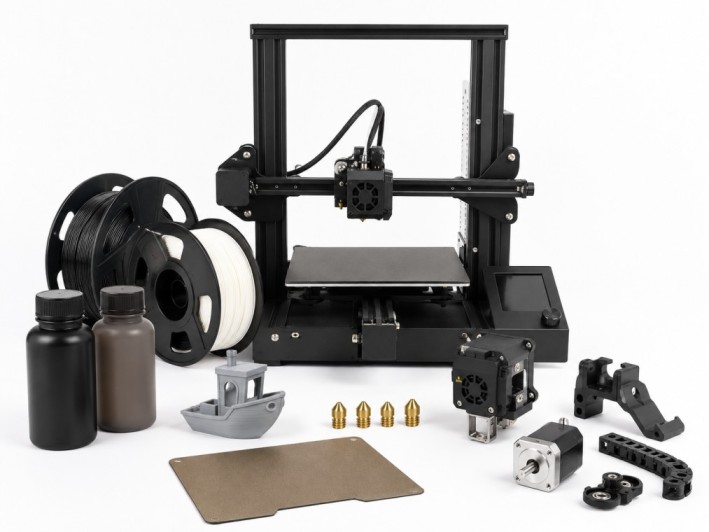
Producing one successful model is useful, but producing the same acceptable part repeatedly is a more demanding goal. Conventional 3D Printing brings together equipment, materials and replacement components for additive-manufacturing workflows across development, engineering and technical production. A controlled process connects design intent with machine capability, material behaviour, verification and maintenance so that printed results remain predictable beyond the first build.
What Does Conventional 3D Printing Include?
Conventional additive manufacturing creates three-dimensional objects by adding material according to a sliced digital model. The category can support filament extrusion, resin-based printing and selected powder or pellet workflows. Each method forms layers differently and therefore presents its own requirements for geometry, support structures, thermal control and finishing.
The wider 3D Printing portfolio allows users to consider additive manufacturing as a connected field rather than a single machine type. The correct route depends on the required part, available equipment, operating environment and validation expectations.
Why Should the Application Be Defined Before the Printer?
Machine selection should follow the component’s job. A visual model may prioritise speed and appearance, while a fixture may need dimensional stability and resistance to repeated handling. Functional parts can introduce requirements for temperature, chemicals, load, impact or electrical behaviour.
Teams should define critical dimensions, service conditions, quantity and acceptable finishing work before comparing equipment. Build volume alone is insufficient. Nozzle or curing capability, chamber control, layer resolution, compatible feedstock and software support determine whether a system can process the part reliably.
How Should Printing Technology and Material Be Paired?
Every process limits which materials can be used. Filament systems melt and place thermoplastics through a nozzle, while resin printers selectively cure a liquid photopolymer. Powder-based approaches rely on another energy and handling profile. These differences affect strength direction, feature resolution, surface quality and post-processing.
The available Printing materials include filaments, resins, powders and pellets. Buyers should compare the exact material with the machine’s temperature range, feed system, build surface and manufacturer guidance. A material name by itself does not guarantee identical performance across grades, colours or reinforced formulations.
What Makes a Digital Model Ready for Production?
A printable file should reflect the behaviour of the selected process. Wall thickness, clearances, overhangs, unsupported spans and hole dimensions all influence whether the design can be built successfully. Orientation affects accuracy and mechanical behaviour because layer interfaces may respond differently from material deposited within a layer.
Before releasing a design, teams can use small coupons or reduced sections to assess fit, shrinkage, bridges and surface details. This approach isolates critical features without consuming the time and material required for a full component. The approved orientation and slicing profile should then be stored with the controlled design revision.
How Can Print Repeatability Be Established?
Repeatability begins with defined inputs. The machine, material batch, software version, build plate, nozzle or optical settings and environmental conditions should be identifiable. A changed parameter may improve one characteristic while weakening another, so unrecorded adjustments make later troubleshooting difficult.
A practical process record may capture:
- Part and revision identifier
- Printer and build-platform details
- Material name, batch and conditioning history
- Slicer version and approved profile
- Orientation and support strategy
- Build time and material consumption
- Post-processing conditions
- Inspection results and observed defects
Trend data can reveal gradual drift before it creates repeated failures. Dimensional checks, mass comparisons and visual inspection are especially useful when applied consistently to the same reference features.
Why Is Post-Processing Part of the Manufacturing Plan?
Printing is not always the final operation. Components may require support removal, washing, curing, sanding or heat treatment. These steps can influence dimensions and mechanical properties, so they should be planned during design rather than added informally after production.
Handling also varies by technology. Uncured resin, fine powder, hot surfaces and sharp support structures create different risks. Operators should follow equipment instructions and safety data, use suitable protection and control ventilation or waste streams where required.
How Do Spare Parts Support Process Continuity?
Nozzles, hot ends, build surfaces and other service items wear or become damaged over time. A worn flow path may alter extrusion, while a compromised platform can affect adhesion and first-layer geometry. Planned inspection helps users replace components before quality deteriorates significantly.
Compatible Spare parts can support maintenance and equipment upgrades, but compatibility must be confirmed against the precise printer model and revision. Keeping critical service items available can shorten downtime, particularly where one machine supports essential production or research work.
What Determines the Real Cost of a Printed Part?
Material price represents only one part of the cost. Machine time, labour, energy, failed builds, supports, post-processing and inspection also contribute. A slower build with fewer defects may be more economical than a fast profile that requires frequent reprinting.
Utilisation matters as well. Nesting compatible parts within the build area can improve output, but excessive packing may complicate cooling, exposure or removal. Cost comparisons should use accepted finished parts rather than the number of print jobs started.
What Should Buyers Review Before Ordering?
A structured purchasing check should include:
- Intended prototype or production application
- Required build size and dimensional capability
- Supported printing technology and feedstock format
- Material, software and profile compatibility
- Temperature, enclosure and ventilation requirements
- Post-processing equipment and available workspace
- Replacement-component availability
- Inspection and traceability expectations
- Operator training and safety documentation
- Estimated throughput and total operating cost
Turning Additive Capability into a Stable Process
Conventional 3D printing becomes most valuable when it is managed as a production system rather than an isolated machine task. Clear application requirements guide technology and material selection, while controlled files, qualified settings and documented inspection support consistency. Planned finishing and maintenance then protect quality over time, helping teams move confidently from an initial prototype to repeatable application-specific parts.